 Primvaria
 · generator
Maillage
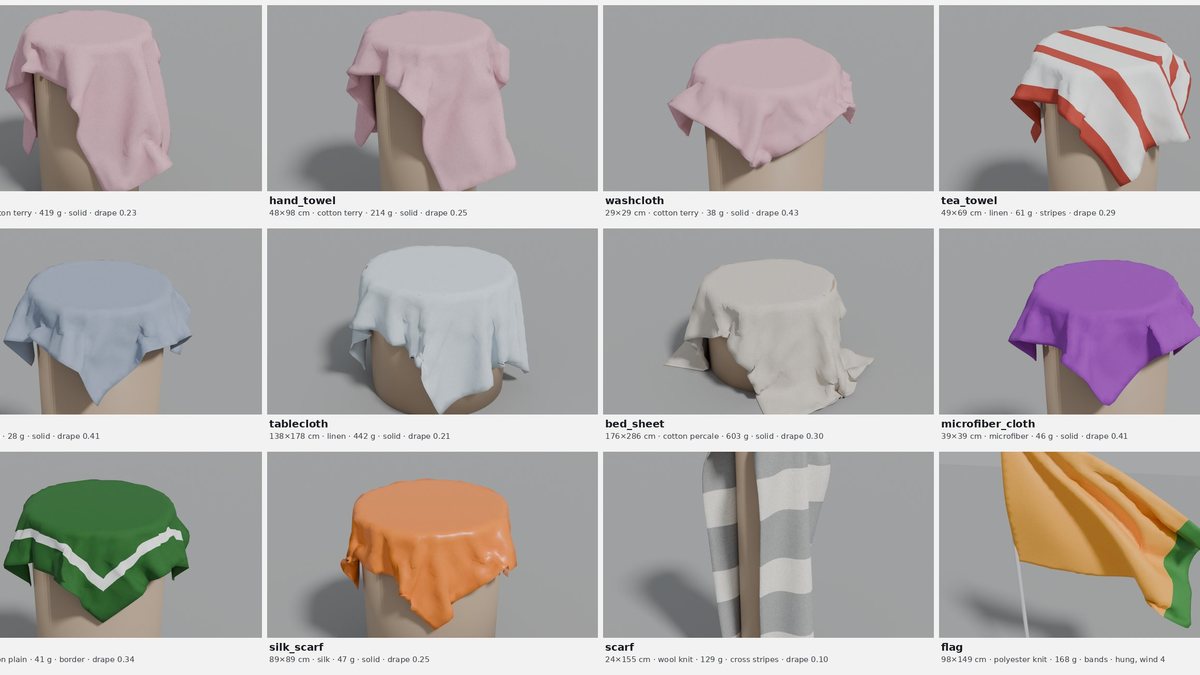
Procedural cloth assets: towels, napkins, tablecloths, sheets, scarves and flags in real sizes and fabrics, meshed for cloth solvers, with engine-neutral stiffness.
What it does
- Generates N distinct pieces of a preset (12 by default): format drawn from real retail sizes, size tolerance, corner rounding, an imperfect cut (wavy edges, slight skew), fabric and pattern.
- Meshes each piece for cloth solvers: near-equilateral triangles for any outline (rounded corners, round tablecloths), or a structured quad grid for rectangles (the topology of a woven fabric).
- Draws a procedural pattern (solid, end bands, stripes along or across, gingham, border, flag bands) as a PNG texture that follows the fabric, not the cut.
- Measures every mesh (area, perimeter, edge lengths, minimum angles) and derives the mass from the fabric's areal density.
- Exports an OpenUSD scene: meshes with UVs, a textured UsdPreviewSurface
material,
hemandpinprimvars, and the fabric's physical properties as custom attributes. - Tests every piece in Blender (
maillage drop-test): import, cloth simulation, automatic checks, Cusick drape coefficient, the draped meshes exported back to OpenUSD and an optional Cycles render. - Exports and tests every piece in MuJoCo (
maillage_<preset>.xml, one flex cloth per piece;maillage sim-test), and exports it for NVIDIA OmniPhysics as surface deformables (maillage_<preset>_omniphysics.usda); see Engines.
Installation
From PyPI:
pip install "maillage[render]"
From a clone, for development:
python -m venv .venv && source .venv/bin/activate
pip install -e ".[render]"        # add ",dev" for tests and linting
Requires Python 3.11+ and usd-core 26.5+ (the OpenUSD bindings). For the Blender drape test, either put Blender on the
PATH, or install Blender as a Python module (pip install -e ".[blender]",
Python 3.13 only, as the bpy wheels exist for one Python version). Tested
with Blender 5.2; Blender 4.2 or later should work.
Earlier usd-core wheels generate the same files, but their OpenUSD
validators do not load (25.5 ships without the validator
libraries, 25.8 and 25.11 without the UsdPreviewSurface definitions), and CI
tests both 26.5 and the newest release.
Usage
maillage list
maillage generate --preset tea_towel                     # 12 pieces, triangles
maillage generate --preset tablecloth --count 20 --seed 3
maillage generate --preset bath_towel --topology grid --vertices 2500
maillage generate --preset napkin --fabric silk --no-cut --no-color
maillage generate --preset tablecloth --format "140x180@2,round:150,oval:140x220"
maillage preview output/tea_towel                        # flat sheet (matplotlib)
maillage drop-test output/tea_towel --pieces 4 --render  # Blender drape test
maillage drop-test output/tea_towel --gif                # + animated GIF (Pillow)
maillage drop-test output/flag --wind 4 --render         # flags hang from a pole
python -m maillage ... works too. Without the bpy module or blender on
the PATH, maillage drop-test prints the command to run with your Blender:
blender -b -P "$(maillage blender-script)" -- output/tea_towel --render
The script does not import Maillage, so Blender's own Python needs nothing installed. From Python:
from maillage import Variations, generate_scene, write_outputs

towels = generate_scene("tea_towel", count=12, seed=1)
write_outputs(towels, "output")  # -> output/tea_towel/

# 40 cm linen squares with a perfect cut, 2,000 vertices each, quad grid
napkins = generate_scene(
    "napkin",
    count=6,
    fabric="linen",
    topology="grid",
    vertices=2000,
    variations=Variations(cut=False),
)
write_outputs(napkins, "output")

# tablecloths in your own sizes: a 140×180 rectangle twice as often as the rest
tablecloths = generate_scene("tablecloth", count=12, formats="140x180@2, round:150, oval:140x220")
write_outputs(tablecloths, "output")
Four short scripts in examples/
show the rest, each explained by its own comments: a first pack and its
ground truth, one aspect switched off, reading the file with OpenUSD alone,
and the drape test in MuJoCo.
Variations
Each aspect has its own random stream: turning one off leaves the others unchanged (same shapes with plain colours, same colours with a perfect cut…).
Option (CLI / Python Variations) |
On (default) | Off |
|---|---|---|
--no-size / size=False |
format drawn, size within the preset's tolerance | first format, exact size |
--no-cut / cut=False |
wavy edges (0.3–6 mm) and skew (up to 1.5°) | perfect cut |
--no-corners / corners=False |
corner radius drawn | middle of the range |
--no-color / color=False |
pattern and colours drawn | first pattern, first colours |
--fabric NAME / fabric="linen" (Variations(fabric=False): first fabric) |
fabric drawn from the preset's mix | one fabric for every piece |
Outputs (per preset, under output/<preset>/)
| File | Content |
|---|---|
maillage_<preset>.usdc |
OpenUSD scene (Blender: File > Import > USD) |
maillage_<preset>_omniphysics.usda |
the same scene with NVIDIA OmniPhysics surface deformables (Omniverse, Isaac Sim 5+): an OpenUSD layer over the main file, see Engines |
maillage_<preset>.xml |
the same scene as a MuJoCo model, one flex cloth per piece, see Engines |
textures/<piece>.png |
pattern texture of each piece |
instances.csv |
one row per piece, read back from the file: its identity, its classes (the semantic labels renderers turn into segmentation masks), every drawn value (variation:<name>) and every measured value (measured:<name>): the ground truth |
manifest.json |
what the pack is (contract, generator, version, preset, seed, aspects, files) and its summary: counts by fabric, pattern, shape and format; mass and mesh statistics |
sheet.png |
flat preview (maillage preview) |
drop_test/ |
drop_test.json, draped.usdc, drop_test.png, drop_test.gif and frames/ (maillage drop-test) |
sim_test/ |
sim_test.json and the MuJoCo model of the test, mujoco_drape.xml (maillage sim-test) |
Engines
Every file is OpenUSD with standard UsdPhysics schemas. Where each engine
stands, as on the Primvaria engine matrix:
| Engine | Status |
|---|---|
OpenUSD validators (usdchecker) |
tested: every preset, OmniPhysics layer included, in CI |
| Blender | tested: drape test of every preset (maillage drop-test) |
| MuJoCo | tested: flex export and drape test of every preset (maillage sim-test); the fabrics drape differently (maillage fabric-test) |
| NVIDIA OmniPhysics (Isaac Sim 5+) | surface deformables exported, structure checked, not simulated yet |
The main file is engine-neutral; engine-specific exports are read back from it, so every engine sees the same piece. Stiffness values, exports and test results: Engines and drape tests.
Limits
The short version; the full list is in Limits and roadmap.
- Stiffness values are orders of magnitude from published ranges, not calibrated against measurements of these fabrics.
- Fabrics drape differently in MuJoCo; in Blender they drape alike.
- The OmniPhysics layer is checked for structure, not simulated yet.
- Flat pieces only: no garments, no folded or crumpled starting states.
Development
git clone https://github.com/drscaon/maillage.git && cd maillage
pip install -e ".[dev]"
pytest
Conventions and continuous integration: Development.
Documentation
| Page | What it holds |
|---|---|
| Usage in depth | The preset list, fabrics, formats, mesh options and how a piece is built. |
| OpenUSD layout and contract | How a piece is laid out in the file, the ground and physics scene, OpenUSD compliance, and what the Primvaria contract writes on every piece. |
| Engines and drape tests | The engine-neutral stiffness, the MuJoCo and OmniPhysics exports, and the drape tests in Blender and MuJoCo with their results. |
| Limits and roadmap | Everything Maillage does not do or has not verified, stated plainly, and what comes next. |
| Development | Branch and release conventions, continuous integration. |
License
MIT © 2026 Daniel Régis Sarmento Caon
The logo is set in IBM Plex Sans (SIL Open Font License 1.1), outlined into paths, so it displays without the font installed.
Maillage is part of Primvaria, physics-ready variability for Physical AI, in OpenUSD: pip install primvaria installs the whole suite (source).